반응형
회사에서 프로젝트 하나를 처음부터 혼자 맡아서 해보고 있다.
api 나오기 전에 얼추 ui는 완성 했는데
탭화면을 이동하다가 각 기종별로 제스처에 뒤로가기를 하면 이전화면으로 돌아갈 수 있도록 하라는 피드백을 받게 됐다.
import { openModal } from "@/components/atom/Modal";
import { useFocusEffect, useRouter, useSegments } from "expo-router";
import { useCallback } from "react";
import { BackHandler } from "react-native";
import { colors } from "../constants";

export const useBackHandler = () => {
  const router = useRouter();
  const segments = useSegments();

  useFocusEffect(
    useCallback(() => {
      const onBackPress = () => {
        const isAtHome = segments[2] === "home";

        if (isAtHome) {
          openModal({
            title: "알림",
            content: "앱을 종료하시겠습니까?",
            buttons: [
              { text: "취소", color: colors.gray[200] },
              {
                text: "종료",
                color: colors.red[100],
                onPress: () => BackHandler.exitApp(),
              },
            ],
          });
          return true;
        }

        if (router.canGoBack()) {
          router.back();
          return true;
        }
        router.navigate("/(drawer)/(tabs)/home");
        return true;
      };

      const sub = BackHandler.addEventListener("hardwareBackPress", onBackPress);
      return () => sub.remove();
    }, [router, segments]),
  );
};
그래서 이러한 hook을 탭 레이아웃 화면에 호출해서 해봤는데
그럼에도 무조건 홈으로 이동하는 문제가 남았다.
일단 expo router는 static 경로로 거의 항상 canGoBack이 false라고 한다.
또 Tabs는 Stack 처럼 위로 쌓이는 구조가 아니라 화면전환만 하기에 이전 화면이라는 기록이 없어 불가하다고 한다....
그래서 stack 구조로 바꿔야 할 것 같다.
이것저것 시도 해봤으니 Tabs로만 이루어진 화면구성으로는 이전화면으로 동작할 수가 없었다.
그래서 Stack으로 전부 교체하고
BottomTabs는 컴포넌트로만 살려서 Tabs처럼 사용하기로 !
수정전 폴더 (화면) 구조

보는 것처럼 drawer 내부에 tabs를 넣고 각각 화면들을 넣었다.
stack은 최상단 Index.tsx와 (drawer) 였다.
수정 후
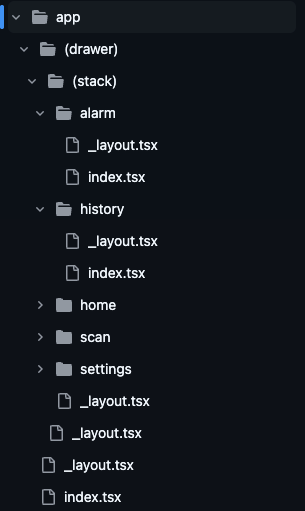
//(stacks)/_layout.tsx

import { openModal } from "@/components/atom/Modal";
import BottomTab from "@/components/ui/BottomTab";
import CustomHeader from "@/components/ui/CustomHeader";
import { colors } from "@/lib";
import { Stack, useRouter, useSegments } from "expo-router";
import React, { useEffect } from "react";
import { BackHandler, View } from "react-native";

export default function StackLayout() {
  const router = useRouter();
  const segments = useSegments();

  useEffect(() => {
    const backAction = () => {
      if (router.canGoBack()) {
        router.back();
        return true;
      }

      const isAtHome = segments[2] === "home";

      if (isAtHome) {
        openModal({
          title: "앱 종료",
          content: "앱을 종료하시겠습니까?",
          buttons: [
            { text: "취소", color: colors.gray[200] },
            { text: "종료", color: colors.red[100], onPress: () => BackHandler.exitApp() },
          ],
        });
        return true;
      }

      return false;
    };

    const backHandler = BackHandler.addEventListener("hardwareBackPress", backAction);

    return () => backHandler.remove();
  }, [segments, router]);

  return (
    <View style={{ flex: 1 }}>
      <Stack
        initialRouteName="home"
        screenOptions={{
          header: () => <CustomHeader />,
          animation: "none",
          contentStyle: { backgroundColor: colors.white },
        }}
      >
        <Stack.Screen name="home" />
        <Stack.Screen name="history" />
        <Stack.Screen name="scan" />
        <Stack.Screen name="alarm" />
        <Stack.Screen name="settings" />
      </Stack>
      <BottomTab />
    </View>
  );
}
stacks의 레이아웃 파일 내부에 BackHandler 기능을 넣어주고
BottomTab은 컴포넌트로 넣었다.
이렇게 하니 이전화면 및 앱종료 기능 해결했다!
화면 이동을 어디까지 다룰지 미리 생각하고 stack과 tabs를 구분해서 사용해야겠다.
반응형
'React Native' 카테고리의 다른 글
| app build에 대하여 (1) | 2025.08.06 |
|---|---|
| [RN] react-native-root-toast 라이브러리로 gif 넣어 커스텀 Toast 만드는 법 (1) | 2025.07.16 |
| yarn local package 만드는 법 (1) | 2025.05.29 |
| [expo] expo-camera를 이용해서 바코드 스캔 구현하기 (0) | 2025.04.29 |
| [expo] eas buil 및 배포하기 및 재배포 (1) | 2025.04.29 |
